
The numbers
- Aimed at the talk: 90 people.
- Assistants: 44 people.
- It was held on January 21st, 2019.
Important: We remind you that in the tool Slack have a channel registered to organize and to share the management of the meetup, specifically the channel we use is #wpalicante of Slack WordPress Spain. If you want to lend a hand, contribute ideas and become more active part of this community follow the instructions on the following page-> http://wp-es.es/slack/
Understanding Google: The Talk
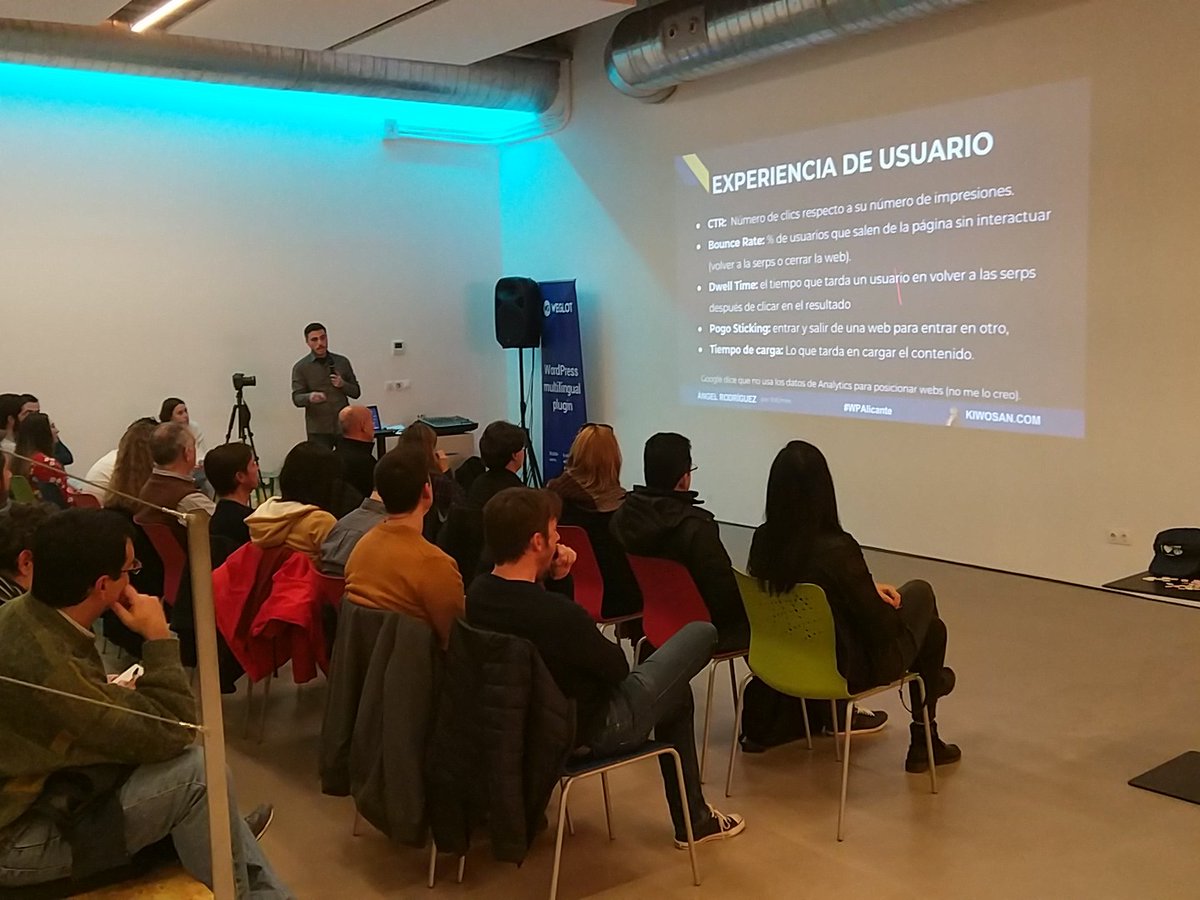
First of all, happy year. This 2019 we return with renewed energies and as you can observe, stepping strong, by the hand of Ángel Rodríguez, CTO of Kiwosan (The tool of SEO made in Murcia), who brings us a fascinating topic that has broken attendance records at our WordPress meetups: "Understanding Google. What nobody tells you about keywords, search intent, and entities."
Angel shows us what is not seen from Google, why does what it does and shows what it shows, and how to get it to show our website as high as possible in the searches.
As always, the last minutes we dedicate to a question time and out of the Ulab continue with our topics of interest via networking accompanied by a beers thanks to our sponsors: Professional Hosting And Weglot, networking that takes place in the kiosk of Plaza San Cristóbal.
We leave a link to the Presentation that Angel used in the meetup And then we point out some interesting notes about it.
Topic Overview
- Google is a private company and organizes the information to be available to everyone, not only allowing access to the most appropriate websites to your needs but offering them directly information without even having to access any website.
- It has an algorithm that improves every year to show the information in your browser. Now incorporates artificial intelligence. Already in 2013 began a dizzying ascent in the process of improving searches as it began to understand the queries of users as a human, relating synonyms (hummingbird algorithm).
- In order to be able to improve the position SERPS, that is to say, to go out well in Google searches we have the SEO, which we can perform On-site U Off-site.
- Google algorithms follow a few steps that we need to understand to improve the SERPS:
- Track the Webs
- Stores them
- Analyses them
- Indexes
- As possible criteria to consider in the SEO is good to consider:
- What Google says in an official way.
- What people can say for their experience.
- What popular culture claims, reaching 200 possible rules to improve positioning.
- Semrush did a study and got 17 important rules to keep in mind. In the presentation you have the detail. In conclusion, the user experience is a determining factor according to this study, since the first rules of the ranking refer to it. Then we would have rules related to the links and finally the classics related to the keywords, their density and context.
- Iñaki Huerta It indicates in one of its presentations that in the SEO it is necessary to take into account three large fronts:
- Semantics: Our website itself, its content.
- Authority: What is not on our website but makes it big and credible, ie external references, links from other websites.
- Tracking and indexing.
- We are interested in knowing:
- What Google understands when a user performs a search, as well as what he understands from our website.
- What the user is looking for in search engines.
- What Google offers depending on the type of search that the user performs.
- What I expected to find the user, or rather, what he wants, what need he expects to cover.
- If we are able to understand what the user expects and what is capable of supplying Google in each case, we will be able to adapt the contents of our web to satisfy the user's needs.
What Google understands
Let's see what Google understands when a user performs a search.
Keywords or keywords
- They are the words that people use to search the seeker. All of them are saved as keywords.
- It is interesting to know that to this day 15% of the daily searches are new (information of Google).
- These words can be used for a lot of improvements in our web: To create articles, to add in descriptions, to create categories...
- They can be sorted by length or by intent of the user.
- By length:
- Short Tail: When looking for a word or two. It implies a generic search. There is a lot of competition because many websites will appear for the same short tail.
- Middle Tail: Formed by 3 or 4 words. You're looking for a little more detail.
- Long Tail: Made up of more than 4 words. He's looking for something very specific. There is little competition and it has been shown that users are increasingly using them (more than 41% of current searches are made using long tails).
- By Search Intent:
- Know something: When the user wants to know something.
- Do something: When the user shows intent to want to do something (buy, sell, travel...)
- Do something with a device: when the user intends to know how a device with a purpose works.
- Find a Web: When the user is looking for a website with a specific purpose
- Find addresses, places...
- It is important to know some interesting methods or practices that Google takes into account and that affect the context in which these keywords are found on our website:
- LSI (latent Semantic indexing): Latent semantic indexing. This means that it is important that keywords are found in a text where other related concepts appear. It is not about using synonyms of keywords but ideas that relate to the keyword. For example, if we are talking about cars, we would have to refer to mileage, fuel, car parts, dealerships...
- Keyword Cluster: This practice has to do with include in a single thematic entry too similar to that we write them in different entries of our web. For example, better to write an article of 1500 words on diets with 3 sections explaining three types of diets, to write 3 articles different of 500 words each with each one of the mentioned diets.
- Head Hierarchy H1-H4: Google uses the headers to understand the structure of the text so it is interesting to use them, without abusing, of course. It should only exist in the input one H1, which will be the title, and it is good to use several H2 to H4 to structure the content. Needless to say, it is highly recommended that keywords are embedded in these headings.
Keyword density
- is the percentage of the occurrence of a particular keyword with respect to the total of keywords used. It is not good to have more than 5 or 6% density in any keyword. Popular culture says the best thing is to hover 2 or 3%.
- In other words, if our website is a car, it is not useful to constantly repeat the word car because there comes a time when the text stops being natural with so much repetition. You have to use the keywords with moderation.
TF * IDF
- It is a mathematical function that links your website with respect to others. Indicate the relevance of your website to the top 10 pages in a keyword.
Schema.org
- Google understands all the structured data schemas that are defined on this platform.
- For those who did not know that this existed, structured data or rich results that can show a web are the pictures that Google shows in their results with the steps of a recipe, the stars you've given a movie or book, or the price of a product No need for the user to go to your website. That information is appearing directly on the Google page. And it does so because your website has filled a series of specific tags that are defined in schema.org.
- In WordPress There are already themes that fill you with automatically structured data, but there are plugins that allow you to do so without knowing how to program. Of course, for those who know programming, you can also fill in manually.
Syntactic, morphological and sentiment analysis
- Google can see if a website is equal to another where we only change words by synonyms. knows what a pronoun, preposition... knows how to identify the gender and number of any word, verbal times. And it also identifies whether you are speaking in positive or negative of a topic or product. Besides, he's able to categorize you.
- Google has a payment tool Qeu teaches you all this information about a paragraph that you indicate. It has an API that allows you to test this functionality for free (AI & Machine Learning products).
- Google does not yet apply all this knowledge on all the websites it analyzes, but it will soon.
External links to your website
- Google is able to identify and analyze all the links that call your website from others, their relationships, the quality of those other websites with respect to your subject...
- The links are the way to link webs with each other and also gives Google the credibility it needs to know about your website. The more prestige you have a website that links you, the more prestige it will grant you. Of course, it gives much more merit to a website related to your topic than one that has nothing to do.
- The perfect link would be that you would have if Google did not exist = = > It does not make sense that a web of sewing us link if ours is of cars.
Entities
- New concept that Google has created to improve the understanding of information on the Internet.
- It is a person, place or thing well definidia and distinguishable to be able to group, to organize and to relate the information.
- For example, the picture that comes out to the right when you're looking for a person, a movie, a book... All of that is entities. This painting is called Knowledge graph.
- Google Associates each entity with all the other entities it is related to. For example, a famous singer entity can associate it to other people in your environment who are known (if you married someone you know, other members of your music group, children or famous parents...) or to famous songs/albums of your group, or to known places where he lived, touched, or at the date he was born if something important happened that day.
- The dates are considered entities if many remarkable things have happened that day.
- All these relationships are used to optimize the content. To do this, it is also important to disambiguize the entities. That is to say that Google knows without a doubt when it has an entity that can be a name of song or of city, of which of the two entities is concerned. This is achieved by the context in which the entity finds itself. That is why it is important to pay special attention to the context in our articles.
User Experience
- Google is able to identify if the user experience with your website is positive or negative, according to some parameters and considers it as important as all the above together.
- Really the only way to know if the user experience is positive or negative is to ask. As this is not possible, we use a series of metrics that bring us as close as possible to this knowledge without having to ask the user.
- CTR (Click through Rate): is the number of clicks that the user performs on your web against the number of impressions (number of times that has been viewed by users). The higher the CTR the more interest is generating our website.
- Bounce Rate: Percentage of rebound. Is the percentage of users leaving the web without interacting. You have to look with affection this metric because it depends on the content of the web, it might not be a bad fact if it was high. For example, if our web is data, the normal is that the user enters, see the data you are looking for and exit, so in that case a high bounce percentage is not bad.
- Dwell time: It is the time that passes since the user clicks on an article in the search engine until he returns to the searching. We are interested to be as big as possible because that will mean that it has stayed on the web snooping other things, jumping from one place to another...
- Pogo Sticking: It is related to the previous. It will be activated if the user enters your website to jump immediately to another without looking at it almost. We must avoid it as much as possible.
- Charging time: It is one of the most important factors of the web. No matter how good the content, if your website takes more than 5 seconds to load the user will look for another without waiting to see it. The acceptable thing is that it takes 2 to 3 seconds to load the entire web. Ideally, it's less than 2 seconds.
- Finally, Google says it does not use Google Analytics data to position but to this day that does not seem viable. Maybe he uses them indirectly, but it seems clear that he has to be using them, so incluyámoslo on our website and check them.
What Google offers
What we discussed below are not guidelines expressly given by Google but conclusions obtained from the experience of use. Without having to enter any website, Google offers different results depending on what we are looking for:
- Images or Thumbnails, when what we are looking for is an object, person...
- Maps when we look for a location.
- Other questions from related users when what is wanted is the definition of a concept (what it is...) or how something works.
- Local Pack: It is a «local business» Card that is shown when you are looking for restaurants, pharmacies... Any business in general (restaurants) or specific (cheap Argentinian restaurant). To show it, obviously, we have had to pre-populate a local business tab of our business.
- Information about an entity, when you ask for one.
What we have to do is analyze in each case what we look for and what Google offers and keep the results of our research in an Excel.
What the user wants
In the table discussed in the previous section is very interesting to add also what the user wants, ie, at what stage of your search is found, which can be:
- Need: When the user is missing something. They tend to be more generic searches.
- Interest— When you are discovering different options that can meet your need. Start to go into details in your searches to get results to compare.
- Consideration: When you compare results so you look for reviews and general opinions.
- Intention: When you have already compared, you seem to have it clear so you are looking for opinions of something concrete to confirm your choice.
- Decision: When you're clear on what you want and you're going to buy it.
In short, what you have to look for is to satisfy the needs of the user, adapting the contents of our website to what we see that Google can offer according to what the user looks for and how to find it.17
Tools
- Kiwosan.com: Low cost SEO tool set (economically affordable.
- PageSpeed— is Google's tool for measuring Web performance. Among other measurements, it offers the loading speed. Google itself has brought an improvement on this page, which is Web. Dev.
- Gtmetrix: A very comprehensive tool for analyzing Web performance. It has execution parameters that allow you to choose operating system, web hosting zone and some other that makes the measurement more accurate. In addition, it shows load graph of each component of the Web, which allows to find out at a glance where the load is slowing down. As a note of optimization, a 80 or 85% is already a good note.
- Tools.pingdom.com: It is another tool of analysis of performance of the web, although it is the least reliable of all the commented.
Final networking questions and issues
- Rich results and schema.org: In this web appear all the schemas that exist with examples of use. Google has its own tool to test the structured data of your website. It is necessary to keep in mind that by the simple fact of using them we are not assuring that Google shows them in the searches. To this day is not known the criterion that uses to decide to show them or not.
- Questions from other users: the questions that are related to what you have done can serve to give us ideas of content to add on our website. At the end of the day are very frequent questions so we know that they are powerful keywords to use.
- There are free tools to analyze the loading time of the web, among other things, that we have left in the section tools. You have to keep in mind that the less you weigh the web the less it takes to load, and fewer requests do better. When it comes to using these tools be clear that one thing is the load rate (seconds it takes to load) and another the optimization of the web. They are usually related but are two different values that the tools offer.
- We recommend another Tool to optimize images.
Glossary
- UX: User experience.
- SEO: (Search Engine optimization) technique to position the best possible in search engines. The higher you appear in a search, the better.
- SEO ON-SITE: Changes you can make on your website to improve search engine positioning. Those are the modifications that depend on you.
- SEO OFF-SITE: Changes that have to occur outside your website, external. For example, presence in other webs, in social networks...
- SERPS: Google search results.
- THUMBNAIL: Thumbnail or version of a picture with minimal resolution to help your recognition without having to get it open.




Leave a reply